“What gets measured gets managed.” Every business owner I know has heard that one, and most of them have a Google Analytics dashboard to prove they believe it.
And most of them never open it.
That line is only true if somebody reads the measurement. A number that never gets read manages nothing. It just sits in a Google account, collecting data on a website that may or may not be bringing in a single customer.
The same conversation, over and over
I’ve had this conversation with a lot of owners.
Somebody set up Google Analytics when the site launched. Maybe the web designer, maybe the owner on a Saturday. Since then they’ve logged in a couple of times, clicked around, and closed the tab.
That’s a fair reaction. Google Analytics is built for analysts, and they’re running a business.
So the one question they care about goes unanswered: is the website bringing in customers, or is it just sitting there?
When we sat down and walked owners through the basics (where visitors came from and which of them filled in a form), the reaction was almost always the same. “Why didn’t anyone show me this?”
They cared plenty. They’d just never had it translated.
We tried the usual fix first
For our own clients, the usual fix was a Looker Studio report. It’s Google’s free report builder: connect the accounts, build the charts, send the link.
For us, it failed. It struggled the moment we connected more than one source, and filtering across them was fiddly at best. Setting up conversions reliably was worse, and conversions are the whole point. If the report can’t tell you how many leads the website brought in, it’s a very pretty traffic counter.
And the charts only go so far. You get a handful of styles, and making them read clearly for an owner who doesn’t live in analytics takes more workarounds than it should.
So in August we built our own Google Analytics dashboard.
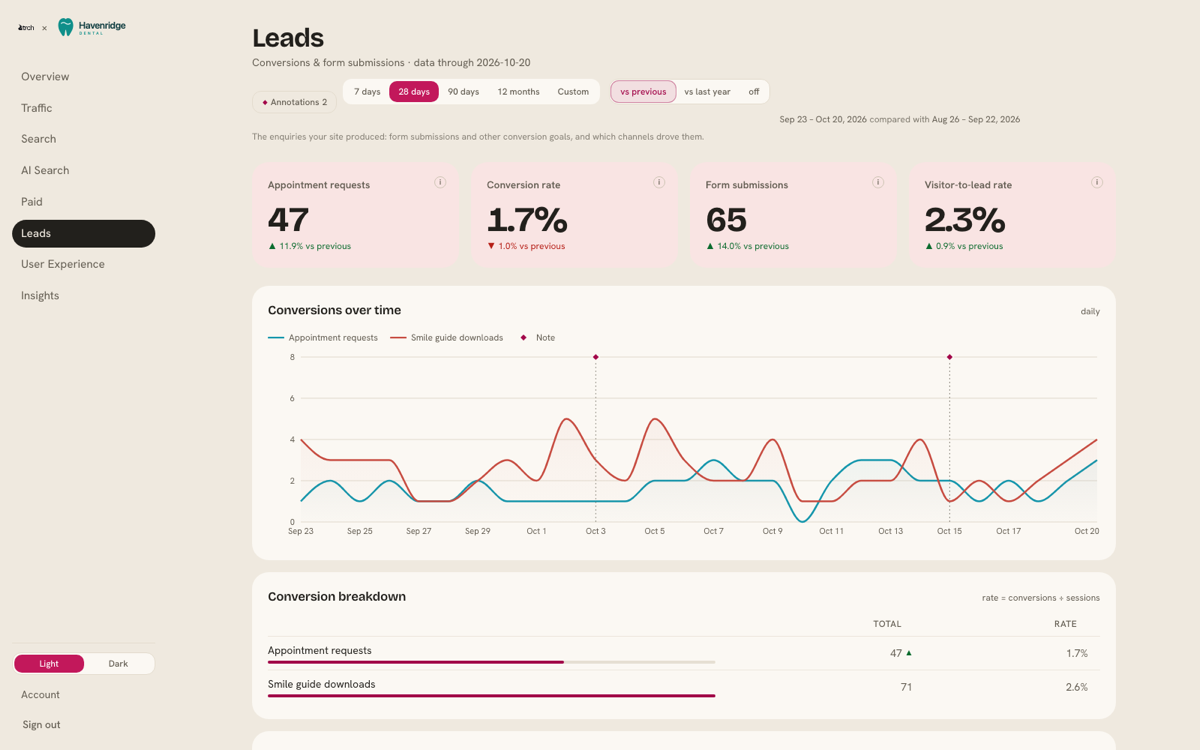
One dashboard per client. It pulls Google Analytics, Search Console, ads and form fills into one place, and every headline number has a short plain-English note underneath saying what it means. It leads with the thing an owner actually wants to know, which is leads: the form fills and bookings that count for that business, set up as goals on a call with us.
James Edmonds, President of First Day Home Care, put it better than I can:
“Finally I can see what our website is producing for us without confusion. Now I can hold my vendors accountable with data.”
Then owners started asking for it
Owners who weren’t TRCH clients started asking if they could have one.
We don’t take low-ticket retainers, frankly. That hasn’t changed. But a dashboard isn’t a retainer. So why sell it? Because the people asking wanted to see what their own website was doing, in language they could read, and to have someone to email when a number looked off.
That’s a product. So we made it one.
It’s the same dashboard our retainer clients get. The difference is the retainer comes with written notes from the team every month, and this plan doesn’t.
What $69 a month gets you
A setup call with a person. We connect your accounts with you and set up the goals that matter to your business. If you don’t have Google Analytics or Search Console yet, we set those up on the same call, at no extra cost.
Everything you already use, at the same price. Google Analytics and Search Console are the start. If you run Google Ads or LinkedIn ads, collect leads through HubSpot, Gravity Forms or Formspree, or use Microsoft Clarity, we connect those too. Same $69. Nothing is an add-on.
Visits from AI assistants. ChatGPT, Gemini, Perplexity and the others are starting to send people to websites like yours. You’ll see how many, which assistants, and what those visitors did next.
Up to two years of history on day one, so you can compare this quarter with the same quarter last year from the start.
A short email every month with your headline numbers and a few plain-English lines on what changed. It’s written automatically, and it says so.
And when something doesn’t make sense, you email support@trch.com and someone at TRCH answers within one business day.
It’s $69 a month per website, or $690 a year. Try it for 14 days, and if it isn’t for you, we refund it.
How it stacks up against other Google Analytics dashboard tools
There are good dashboard tools out there. Here’s what five of them say about themselves, taken from each company’s own website in October 2026.
| Who it’s built for | Starting price, as listed | Free plan or trial | |
|---|---|---|---|
| Looker Studio | People who build their own reports | Free (Pro is $9 per user, per project, per month) | Free |
| Databox | Analysts, teams and agencies | $71 a month, billed annually | Free plan, 3 data sources |
| DashThis | Agencies and marketers | $44 a month billed yearly, or $54 monthly, for 3 dashboards | 14-day trial |
| AgencyAnalytics | Agencies | $20 per client, per month, billed annually | 14-day trial |
| Swydo | Agencies | $69 a month | 14-day trial |
| TRCH Analytics | The owner of the business | $69 a month per website, setup call included | 14-day money-back |
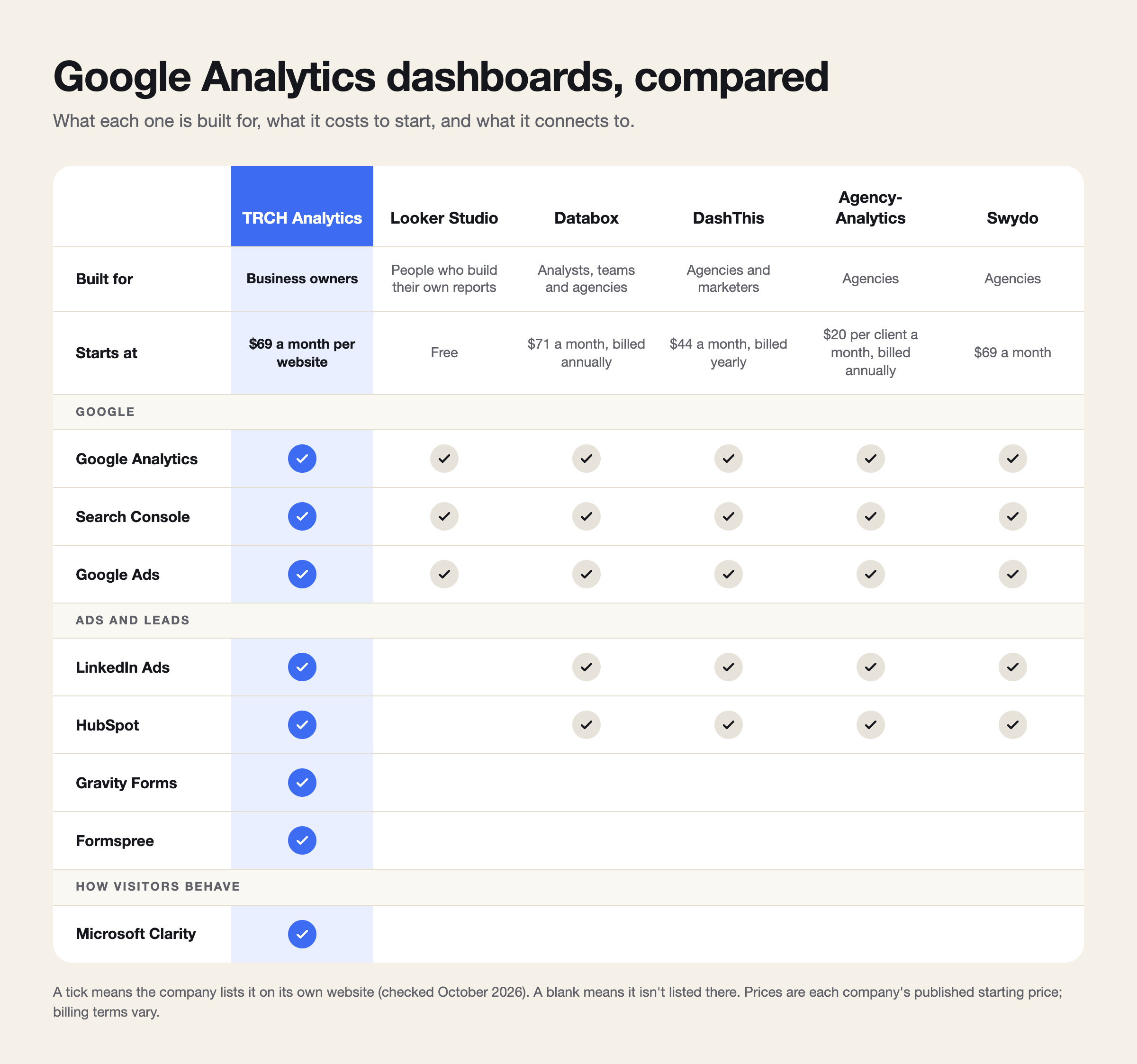
Look at the second column. Every one of those tools is built for someone whose job is building reports, either for themselves or for an agency’s clients. They’re good at that. And if you’re an analyst, or an agency running 40 client accounts, one of them is probably the right call.
TRCH Analytics is built for the person who reads the report. We set it up with you on a call, and the dashboard explains itself in plain English.
See it before you decide
Havenridge Dental is a made-up dental practice with a year of made-up data. Its dashboard is the real thing. Click around as long as you like.
When you’re ready, it’s at trchanalytics.com.
You’re paying for a website every month. Shouldn’t you know whether it’s working?